Why a Competitor With Fewer Reviews Shows Up Above You on Google Maps
You've been in business for 12 years. You have 140 reviews and a 4.8. The guy across town opened three years ago, has 38 reviews, and you've personally fixed two of his jobs.
He still shows up above you on Google Maps. In half the city, you don't show up at all.
That's not bad luck, and it's not because Google loves him. Google's local results run on rules, and most owners were never told what they are. Once you see them, the "unfair" result usually makes sense, and you can see which parts you can change.
Reviews matter. They're just not at the top of the list.
Google says local results are based on three things: relevance (how well your profile matches the search), distance (how far you are from the person searching), and prominence (how well known and trusted you are, which is where reviews live).
When local search experts rank the individual factors, reviews don't come first. In Whitespark's 2026 Local Search Ranking Factors survey, the top two factors for the Google Maps "3-pack" were your primary Google Business Profile category and proximity to the searcher. Neither has anything to do with how many reviews you have.
So a competitor with fewer reviews can beat you for two very ordinary reasons:
Google thinks his profile is a better match for the search.
He's closer to the person searching.
Why "closer" changes everything
This is the part most owners miss, because they check their ranking from their own office.
When you search "plumber near me" from your shop, Google measures distance from your shop. Of course you look good. When a homeowner searches the same phrase 8 miles away, Google measures from their kitchen. If your competitor's address is closer to that kitchen, he starts with an advantage that your 140 reviews may not overcome.
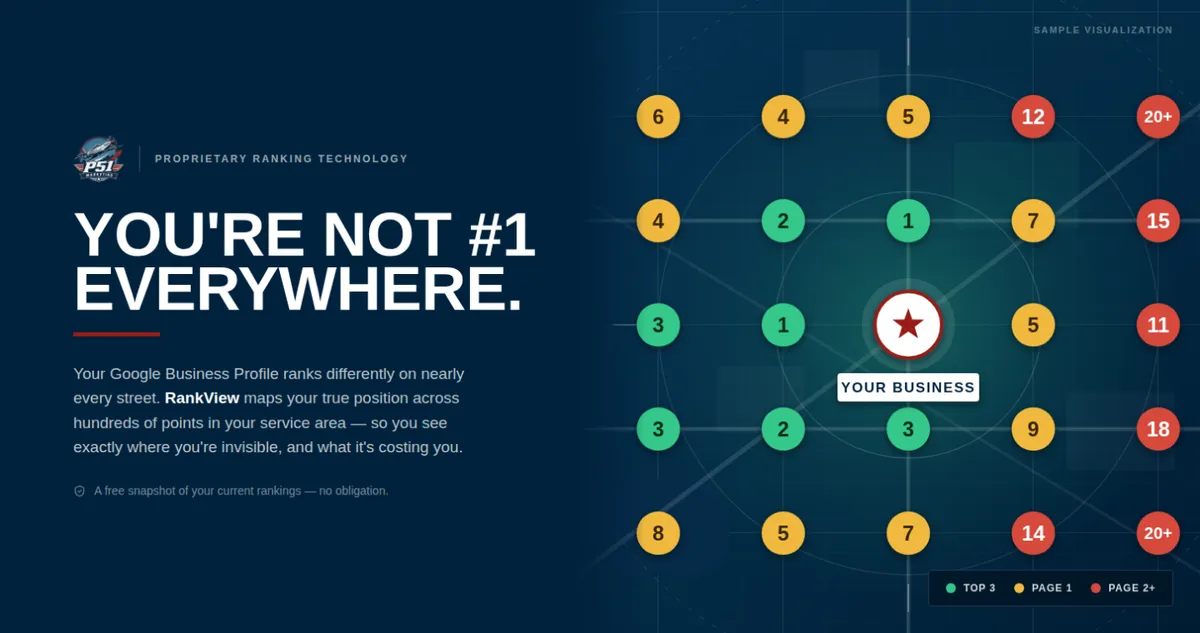
That's why the same competitor can be invisible near you and dominant on the other side of town. When we run a RankView scan, this shows up as a split map: green near your address, red where his address gives him the edge. One search from your desk will never show you that.
The 4 causes, and which ones you can fix
1. His primary category is a better match (fixable).
Your primary category is the single biggest relevance setting on your profile. If he's set as "Plumber" and you're set as "Water Heater Installation Service" because that's your favorite work, Google sees him as the better answer for "plumber near me." Check what category the top 3 businesses for your main search are using. If they all share one and you don't, that's your first fix.
2. His profile is more complete (fixable).
Services listed, service areas, business description, hours, photos, products, Q&A. Every empty field is a missed chance to match a search. Owners who set up their profile in 2019 and never touched it again usually have half of it blank.
3. His business name has keywords in it (sometimes fixable).
If his profile name is "Smith Plumbing | Emergency Plumber Atlanta" but the sign on his truck says "Smith Plumbing," he's stuffing keywords into his name. It works, and it breaks Google's guidelines. You can't do the same thing without risking your own profile, but you can report it to Google using its Business Redressal Complaint Form. Don't rename your business to compete with a violation.
4. He's closer to the searcher (not fixable).
You can't move your shop for every search, and you shouldn't try. A service-area business is still ranked from its verified address, even when that address is hidden. What you can do is win the areas near you decisively and stop paying for ads in the areas where you already rank (more on that in our next RankView article).
What about reviews, then?
Reviews still matter a lot. They're part of prominence, and they decide who gets the click once the 3-pack shows up. A business with 140 reviews at 4.8 wins more calls than one with 38 reviews at the same position.
But reviews can't make up for a wrong category or a blank profile. If your relevance and completeness are behind, piling on more reviews is like adding horsepower to a car with the parking brake on.
How to find out which one is hurting you
Here's a 15-minute check you can do today:
Search your main service from your phone with location on. Note the top 3 businesses.
Open each profile and write down its primary category. (The first category listed under the business name.)
Compare their profiles to yours, field by field. Count the empty spots on yours.
Look at their business names. Do they match their signs and websites?
That will tell you about causes 1 through 3. It won't tell you about cause 4, because you're only searching from one place.
That's what RankView is for. It checks your live Google ranking from a grid of points across your whole service area and maps it in green, amber, and red, so you can see exactly where a competitor beats you and where you're winning. If you haven't read why your ranking isn't one number, start here.
See exactly where he's beating you
Want to see the map for your business and your top competitor? Get a free RankView scan, or join our live RankView webinar every Thursday at 12 PM Eastern, where we run real scans and walk through what they mean.


