You're Paying for Ads in Neighborhoods Where You Already Rank #1
Every month you pay for Google or Facebook ads. Every month you wonder if any of it is working.
Here's a question most owners have never been asked: in which neighborhoods are you paying for clicks you would have gotten for free?
If you set your ads to "my whole city" or "25 miles around my shop," the answer is probably "a lot of them."
Free clicks and paid clicks are showing up in the same place
When someone near your shop searches for what you do, two things can show up: your ad, and your free listing in the Google Maps results. If you already rank in the top 3 on the map in that neighborhood, a lot of those people were going to find you anyway.
So when they click the ad instead of the free listing, you just paid for a customer you already had.
That doesn't mean ads near your shop are always wasted. Some people click ads first, and showing up twice can help. But it does mean the dollars there are working much less hard than dollars spent where you're invisible.
The places your ads should be working hardest
Now flip it around. On the far side of town, where you rank on page 2 of the map, nobody is finding you for free. Those neighborhoods are where an ad is the only way you get seen at all.
Most owners have their budget backwards. They spread it evenly across the whole service area, which means:
Too much money goes to neighborhoods where you already win on the map.
Too little money goes to neighborhoods where you are invisible.
How to see where you rank, block by block
You can't fix this from one search on your phone, because that only shows your ranking from where you're standing. You need to see your ranking across your whole service area.
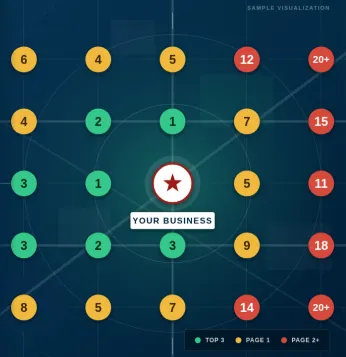
That's what a RankView scan does. It checks your Google Maps ranking from a grid of points across your market and color codes each one:
Green: top 3 on the map. You're getting found for free here.
Amber: page 1, but not top 3. You're visible but losing clicks.
Red: page 2 or worse. Nobody finds you here without paying.
Lay that map next to your ad targeting and the waste usually jumps right out.
How to move the money
Once you can see the map, the fix is simple. Google Ads lets you target by radius, city, or ZIP code, exclude areas, and raise or lower bids by location. Facebook and Instagram ads let you target by ZIP code and radius too.
Green zones: lower your bids, or exclude them if your budget is tight. Keep your brand name terms running so competitors can't steal searches for you by name.
Amber zones: keep a normal budget. Ads help you win clicks while your map ranking climbs.
Red zones: put the most money here. This is where ads are doing work your free listing can't.
Then re-scan every month. As your map ranking improves in the amber and red zones, you can pull ad money back from those too. Your ads should be shrinking where your free ranking is growing.
What this looks like in real numbers
Say you spend $1,500 a month spread evenly across five areas, $300 each. A RankView scan shows you already rank top 3 in two of them.
Move most of the $600 from those two areas into the three areas where you're amber or red. Same total budget, but now it's going where customers can't already find you. The goal is more calls from the same spend, because you've stopped paying for customers who were finding you for free.
(That example is for illustration. Your numbers will depend on your market and your trade.)
See where your money is going
If you're running ads without knowing where you rank on the map, you're guessing. Get a free RankView scan and we'll show you exactly which neighborhoods you already own, and which ones need your ad dollars.
Want to see it live? Join our RankView webinar every Thursday at 12 PM Eastern, where we run real scans and walk through what they mean.
If you haven't read why your ranking changes from neighborhood to neighborhood, start here. And if a competitor keeps beating you on the other side of town, read why that happens.


